
Aaj ke fast-paced digital world me log nature, greenery aur calm vibes ki taraf zyada attract ho rahe hain. Farm fields, open sky, soft sunlight aur peaceful rural aesthetics ye sab visuals Instagram par bahut pasand kiye jaate hain. Isi trend ko AI ke saath combine karta hai Aura Farm style.
Google Gemini Aura Farm AI Photo Editing Prompts ki madad se aap kisi bhi normal photo ko peaceful farm, village life aur nature-aura look me convert kar sakte ho.
Is article me tum jaanoge:
- Aura Farm AI Photo Prompt kya hota hai
- Google Gemini se farm-style aesthetic photos kaise banayein
- Prompt ko sahi tarike se kaise use karein
- Different Aura Farm styles ke liye prompt placeholders
Google Gemini Aura Farm AI Photo Prompt Kya Hota Hai?
Aura Farm AI Photo Prompt ek text-based instruction hota hai jo AI ko batata hai:
- Scene farm ya rural environment jaisa ho
- Green fields, crops, trees, open sky dikhna chahiye
- Light soft, warm aur natural ho
- Overall mood calm, peaceful aur aesthetic lage
Agar prompt clearly likha ho, to AI output real farm photography jaisa feel deta hai.
Aura Farm AI Photos Kyun Trend Kar Rahe Hain?
Is style ke trend hone ke kuch strong reasons hain:
- Nature aesthetic – evergreen & calming
- Soft lighting – pleasing to the eyes
- Instagram DP & reels friendly
- Global rural-life appeal
Isi liye travel pages, aesthetic creators aur calm-vibe profiles Aura Farm AI edits use kar rahe hain.
Google Gemini Se Aura Farm AI Photo Kaise Banayein?
Step 1: Google Gemini Open Karein
Gemini AI ka image generation ya image editing feature open karein.
Step 2: Apni Photo Upload Karein
- Agar apni photo ke saath farm background chahte ho to clear image upload karein
- Natural pose best result deta hai
Step 3: Prompt English Me Paste Karein
- Prompt English me hi paste karein
- Nature elements clearly mention karein
Step 4: Generate & Improve
- Output check karein
- Agar colors zyada bright lagein to “soft, natural tones” add karein
- 1–2 prompt variations try karein
Google Gemini Aura Farm AI Photo Prompts
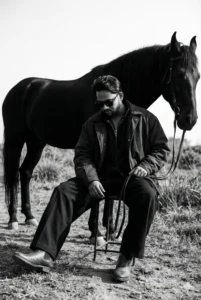
Create a cinematic monochrome fashion portrait rendered in 1080p with a refined editorial tone. The subject is seated low on a simple metal stool, legs stretched forward and resting naturally on rough outdoor ground. One hand hangs loosely between the knees, holding thin leather reins, while the shoulders remain slightly slouched and the head gently lowered, conveying a quiet, introspective mood.

The subject is styled in dark, oversized layered garments, including wide-leg trousers, leather boots, and dark sunglasses, forming a strong avant-garde silhouette.

A powerful black horse stands close behind the subject, aligned protectively and partially overlapping the figure’s outline, reinforcing a sense of strength and calm dominance.

The setting is an open natural landscape with uneven terrain and wild grass. The sky appears bright and slightly overexposed, creating bold negative space and visual contrast.

Use high-contrast black-and-white lighting with deep blacks, soft highlights, and a matte finish. Apply a medium-format film aesthetic with subtle grain for a timeless, luxury fine-art editorial feel.

Important: The subject’s face must remain exactly identical to the reference image, with no changes to identity, features, or expression.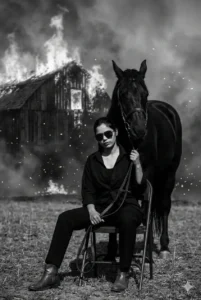
Create a cinematic black-and-white fashion portrait of a confident young woman seated on a metal chair in an open rural field. She wears an open black shirt layered over dark attire, paired with black trousers, leather boots, and dark sunglasses. Horse reins rest loosely in her hand as her head tilts slightly downward, expressing calm strength and fearless composure.

Behind her stands a powerful black horse, positioned close with its head near her shoulder, projecting a dominant yet controlled presence.

In the background, an old wooden barn is engulfed in flames, with thick smoke rising into the air and glowing sparks and embers drifting across the scene.

Use dramatic, high-contrast monochrome lighting to create a moody, intense atmosphere. Apply ultra-realistic detail, cinematic depth of field, and a refined fashion-editorial aesthetic.

The final result should feel bold, timeless, and cinematic, rendered in 4K quality with strong visual impact.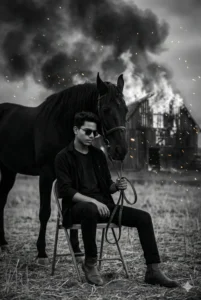
Create a cinematic black-and-white fashion portrait of a confident young man seated on a metal chair in an open rural field. He is styled in an open black shirt layered over dark attire, paired with black trousers, leather boots, and dark sunglasses. Horse reins rest loosely in his hand, while his head tilts slightly downward, conveying calm strength and fearless composure.

A powerful black horse stands close behind him, with its head positioned near his shoulder, projecting a dominant and protective presence.

In the background, an old wooden barn is engulfed in flames, sending thick smoke into the air as glowing sparks and embers drift across the scene.

Use dramatic, high-contrast monochrome lighting to build a moody, intense atmosphere. Apply ultra-realistic detail, cinematic depth of field, and a refined high-fashion editorial aesthetic.

Render the final image in 4K quality, and preserve the subject’s face exactly as shown in the reference image, with no alterations to identity or features.Aura Farm AI Photos Ko Viral Kaise Banayein?
- Over-saturation avoid karo
- Natural poses & candid moments best lagte hain
- Caption example: “Peaceful farm aura (AI edit)”
- Hashtags: #AuraFarm #AestheticNature #GeminiAI
Common Mistakes Jo Avoid Karni Chahiye
- Artificial neon colors
- Over-editing effects
- Low-resolution input photos
- Prompt Hindi me likhna
Final Words
Google Gemini Aura Farm AI Photo Prompts un creators ke liye perfect hain jo nature, simplicity aur peace ko visual form me dikhana chahte hain. Sahi prompt aur soft aesthetic ke saath aap kisi bhi normal photo ko calming, farm-style aur Instagram-ready artwork me convert kar sakte ho.
Agar aap aise hi copy–paste ready AI photo editing prompts Hindi me chahte ho, to Bloggerohan.com ko bookmark karna mat bhoolna. Yahan par aapko milte rahenge latest, trending, aur working AI prompts.
Also Read:
- Celebrity Selfie AI Video Prompt for Instagram Reels
- Viral AI Police Arrest Photo Editing Prompt 2026

I’m Rohan, an AI prompt creator from Kanpur, UP, India, focused on sharing copy–and–paste–ready AI photo and video editing prompts for modern content creators.
It dosent come out the exact photo
Brother Fir Se Try karo with Different Image
Thank you Rohan sir 😁
Welcome Brother