
26 January Republic Day India ka sabse proud aur patriotic din hota hai. Tiranga, army parade, Ashoka Chakra aur deshbhakti vibes ye sab visuals har saal social media par trend karte hain. Lekin sirf normal photos ab kaafi nahi; log chahte hain cinematic, poster-style aur premium Republic Day edits jo social media par post karte hi viral ho jaye.
Isi trend ko power deta hai AI Photo Editing, jahan aap Google Gemini jaise tools se 26 January Republic Day AI Photo Editing Prompts use karke apni photos ko high-impact patriotic visuals me badal sakte ho.
Is article me tum jaanoge:
- Republic Day AI Photo Editing Prompt kya hota hai
- AI se Republic Day photos kaise banayein
- Prompt ko sahi tarike se kaise use karein
- Different Republic Day themes ke liye prompt placeholders
26 January Republic Day AI Photo Editing Prompt Kya Hota Hai?
Republic Day AI Photo Editing Prompt ek text-based instruction hota hai jo AI ko batata hai:
- Photo ka theme Republic Day (26 January) ho
- Tiranga colors (saffron, white, green) clearly dikhein
- Ashoka Chakra, India Gate, army ya parade elements add hon
- Overall look patriotic, cinematic aur respectful ho
Agar prompt clear ho, to AI output poster-level Republic Day artwork jaisa lagta hai.
Republic Day AI Photos Kyun Viral Hoti Hain?
Is trend ke popular hone ke kuch strong reasons:
- High patriotic emotion – instant connection
- Cinematic poster look – eye-catching visuals
- DP, Post & Reel friendly – high engagement
- Seasonal demand – January me searches peak par
Isi liye creators aur pages Republic Day AI edits ko har saal use karte hain.
AI Se 26 January Republic Day Photo Kaise Banayein?
Step 1: AI Tool Open Karein
Google Gemini AI image editing tool open karein.
Step 2: Apni Photo Upload Karein
- Clear face photo upload karein
- Close-up ya mid-shot best result deta hai
Step 3: Prompt English Me Paste Karein
- Prompt English me hi likhein
- Patriotic elements clearly mention karein
Step 4: Generate & Improve
- Output check karein
- Agar face distort ho to “keep facial features natural” add karein
- 1–2 variations try karein
26 January Republic Day AI Photo Editing Prompts
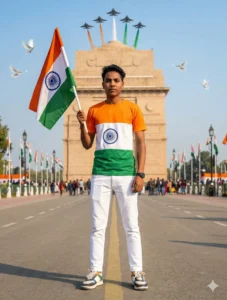
Use the uploaded selfie strictly as an accurate facial reference and preserve the subject’s identity without any changes. Create a highly realistic, cinematic full-body Republic Day image.

The person stands confidently on a clean roadway directly in front of India Gate, New Delhi, facing the camera with a proud, composed expression. He is dressed in a stylish tricolor T-shirt (saffron, white featuring the Ashoka Chakra, and green), paired with bright white trousers, fashionable footwear, and a wristwatch on the left hand. He holds the Indian national flag with pride.

In the background, India Gate appears tastefully decorated under a clear blue sky. White doves fly gracefully, while Indian Air Force jets soar overhead, leaving tricolor smoke trails. The background elements are slightly softened to maintain focus on the subject while preserving realism.

The overall mood is vibrant and patriotic, with balanced cinematic lighting, natural shadows, sharp focus, and realistic skin texture. Avoid wide-angle distortion or artificial blur.

The final image should feel DSLR-captured, ultra-clear, and premium—rendered in Ultra-HD 4K quality, perfectly optimized for Instagram and social media use.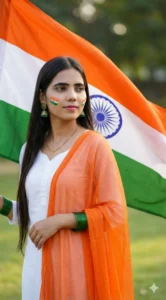
Use the provided reference photo to preserve the subject’s face exactly as it is, with no changes to facial features or identity. Create an ultra-realistic, high-resolution outdoor portrait of an Indian woman standing gracefully with a large Indian national flag (Tiranga) flowing behind her.

She has long, straight dark hair and wears natural makeup with soft pink lipstick. A small tricolor face-paint design is visible on her cheek, adding a subtle patriotic touch. She is dressed in a simple white kurti, paired with a sheer orange dupatta draped over one shoulder, gently moving in the breeze. Green bangles adorn both wrists, complemented by a delicate gold nose pin, a fine gold necklace, and traditional green jhumka earrings.

The scene is lit with soft natural daylight, creating gentle highlights and realistic shadows. A light breeze adds motion to both the dupatta and the flag. The background features green grass with a soft bokeh blur to keep focus on the subject.

Her expression is elegant and patriotic, with her gaze turned slightly to the side. The final image should be sharp, lifelike, and cinematic—DSLR-quality, 8K ultra-realistic, with natural skin texture and fine detail throughout.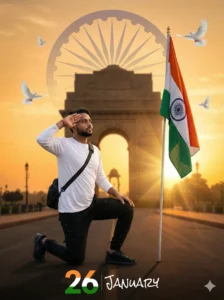
Create an ultra-realistic, emotionally powerful patriotic portrait using the uploaded Indian boy as the exact facial reference. He is kneeling on one knee, with his right hand raised in a salute, while a large Indian tricolor flag stands firmly planted beside him.

He is dressed in a white long-sleeve T-shirt, black cargo trousers, black sneakers, and a sling bag, giving a modern yet grounded appearance.

The background features India Gate at sunrise, bathed in warm early-morning light. A softly faded Ashoka Chakra blends naturally into the glowing sky, while gentle sun rays stream through the scene. White doves fly gracefully overhead, adding a peaceful and hopeful tone.

Use moody cinematic lighting with a shallow depth of field to isolate the subject. Preserve natural skin texture, realistic shadows, and lifelike details throughout.

Add refined graphic elements:
• An elegant “26” designed in the three Indian flag colors
• The word “JANUARY” written in a handwritten-style font with a subtle blur effect

The final image should feel deeply patriotic and emotional, rendered in 8K DSLR-quality realism, with cinematic depth and authentic visual clarity—perfect for Republic Day artwork.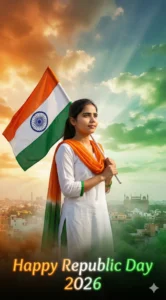
Use the uploaded photo as the sole facial reference. The face must remain completely unchanged—no beautification, smoothing, reshaping, or regeneration. Facial identity must match the reference 100% exactly, including eyes, nose, lips, jawline, skin texture, and expression.

Create an ultra-realistic, cinematic Republic Day 2026 portrait of a young Indian woman standing with pride beneath a dramatic tricolor-themed sky.

Pose & Presence:
• She stands confidently at the center of the frame
• The Indian tricolor flag is raised high over one shoulder
• One hand firmly grips the flagpole
• The other arm rests naturally by her side
• Body facing forward, chin slightly lifted
• Eyes gazing toward the horizon
• Expression: strong, hopeful, and patriotic

Face & Skin (Strict Identity Lock):
• Face taken directly from the uploaded reference image
• Natural skin texture with visible pores
• No beauty filters or AI alterations
• Sharp, clean HD facial detail

Outfit – Tricolor Elegance:
• Flowing white attire
• Saffron scarf moving in the wind
• Green accents through borders or jacket elements
• Realistic fabric texture and natural folds

Background (Distinct & Open):
• Expansive Indian skyline
• Sky glowing with saffron, white, and green-toned clouds
• Soft sunlight rays breaking through the clouds
• Gentle tricolor mist or smoke drifting across the scene
• Grand, inspirational patriotic atmosphere

Text Element:
• Cinematic glowing tricolor text reading “Happy Republic Day 2026”

Lighting & Mood:
• Dramatic natural sunlight
• Soft glow highlighting the face
• High contrast while preserving natural skin tones
• Emotional, uplifting, and inspirational patriotic tone

Camera & Quality:
• DSLR-style cinematic capture
• Medium-to-full body framing
• Shallow depth of field
• Ultra-realistic 4K–8K resolution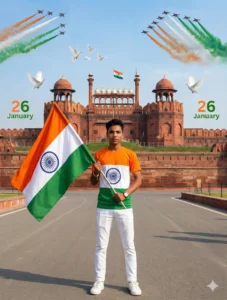
Use the uploaded selfie strictly as an accurate facial reference and preserve the subject’s identity without any changes. Create an ultra-realistic, cinematic full-body Republic Day portrait.

The person stands confidently on a roadway directly in front of Red Fort, Delhi, facing the camera with a proud, composed expression. He is dressed in a modern tricolor T-shirt (saffron, white featuring the Ashoka Chakra, and green), paired with bright white trousers, stylish footwear, and a wristwatch on the left hand. He holds the Indian national flag firmly.

In the background, Red Fort appears clearly with the Indian flag visible. The sky is bright blue, white doves fly gracefully, and Indian Air Force jets streak across the sky, leaving tricolor smoke trails.

Add elegant text reading “26 January” placed tastefully on either side of the composition.

The overall mood should feel vibrant and patriotic, with balanced cinematic lighting, natural shadows, realistic skin texture, and sharp subject focus. Keep the background slightly softened for depth.

The final image should look professionally captured, ultra-HD quality, polished, and perfectly optimized for Instagram and social media use.
Republic Day AI Photos Ko Viral Kaise Banayein?
- Respectful aur clean visuals rakho
- Over-editing ya fake elements avoid karo
- Caption example: “AI-generated Republic Day edit”
- Hashtags: #RepublicDay #26January #AIPhotoEdit
Ye cheezein reach, saves aur shares badhati hain.
Common Mistakes Jo Avoid Karni Chahiye
- Tiranga colors galat use karna
- Over-dramatic effects
- Low-resolution photos
- Prompt Hindi me likhna
Final Words
26 January Republic Day AI Photo Editing Prompts creators ke liye ek perfect seasonal opportunity hai. Sahi prompt aur respectful presentation ke saath aap simple photos ko patriotic, cinematic aur share-worthy Republic Day visuals me convert kar sakte ho.
Agar aap aise hi copy–paste ready AI photo editing prompts Hindi me chahte ho, to Bloggerohan.com ko bookmark karna mat bhoolna. Yahan aapko milte rahenge latest, trending aur working AI prompts.
Also Read:
- Viral AI Police Arrest Photo Editing Prompt 2026
- Google Gemini Aura Farm AI Photo Editing Prompts 2026

I’m Rohan, an AI prompt creator from Kanpur, UP, India, focused on sharing copy–and–paste–ready AI photo and video editing prompts for modern content creators.