
Aaj ke social media ke era me character intro sirf movies tak limited nahi raha. Instagram Reels, Shorts aur DP me log apna hero-style, villain-style ya powerful character introduction dikhana chahte hain. Dark background, intense eyes, cinematic lighting aur bold attitude.
Is trend ko create karna ab easy ho gaya hai Google Gemini ki madad se. Bina editing skill ke Google Gemini Character Intro AI Photo Editing Prompt use karke aap apni normal photo ko movie-style character introduction poster me convert kar sakte ho.
Is article me tum jaanoge:
- Character Intro AI Photo Editing Prompt kya hota hai
- Google Gemini se cinematic character intro kaise banayein
- Prompt ko powerful & cinematic kaise likhein
- Different character intro styles ke liye prompt placeholders
Character Intro AI Photo Editing Prompt Kya Hota Hai?
Character Intro AI Photo Editing Prompt ek text-based instruction hota hai jo AI ko batata hai:
- Subject ka look powerful, confident ya mysterious ho
- Expression intense ho (hero/anti-hero / villain vibe)
- Lighting cinematic (dark shadows, rim light, glow) ho
- Background moody, smoky, ya dramatic ho
Sahi prompt ke saath AI output movie poster ya reel intro frame jaisa lagta hai.
Character Intro AI Edits Kyun Viral Hote Hain?
- Movie-style feel – high visual impact
- Attitude & confidence – youth audience attract hoti hai
- Instagram Reels & DP friendly
- Strong first impression – share-worthy content
Isi liye creators aur influencers character intro AI edits ko reels aur profile photos me use kar rahe hain.
Google Gemini Se Character Intro AI Photo Kaise Banayein?
Step 1: Google Gemini Open Karein
Gemini AI ka image generation ya image editing option open karein.
Step 2: Apni Photo Upload Karein
- Clear face photo upload karein
- Serious, neutral ya confident expression best rehta hai
Step 3: Prompt English Me Paste Karein
- Prompt English me hi likhein
- Cinematic, attitude aur lighting details mention karein
Step 4: Generate & Improve
- Agar face thoda change ho to add karein:
“keep facial features natural and unchanged” - 1–2 variations try karein
Google Gemini Character Intro AI Photo Editing Prompts
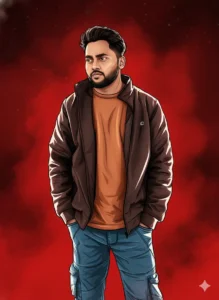
Create a cinematic digital illustration using the person from the reference photo, with strict identity preservation.

Face & Identity Lock:
• Keep the exact same face, hairstyle, expression, skin tone, and pose
• Zero distortion, reshaping, or alteration
• Identity must remain instantly recognizable

Art Style & Mood:
Transform the scene into a deep red, high-contrast Tamil gangster movie poster aesthetic. Replace the background with rich red gradients, a smoky atmospheric haze, and subtle textured layers to enhance intensity.

Apply bold comic-book–style shading, thick confident outlines, strong black shadows, and glossy highlights across the skin and clothing to create a dramatic illustrated look.

Outfit & Lighting:
• Retain the original outfit design
• Enhance it with richer tones, clean fabric folds, and dynamic cinematic lighting
• Add intense highlights along the jawline, cheekbones, shoulders, and body edges to emphasize strength and attitude

Overall Feel:
• Gritty, powerful, and cinematic
• Dramatic lighting with extreme contrast
• Ultra-detailed line work
• Sharp edges and high clarity
• Vibrant red-dominated atmosphere
• Strong action-movie poster energy

Render in 4K illustration quality, with a polished, high-impact, theatrical finish suitable for a Tamil action film poster.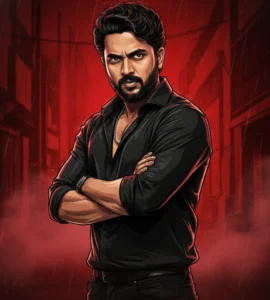
Create a cinematic digital illustration in 8K quality using the exact person from the attached reference image, with strict identity preservation.

Face & Identity Lock (Mandatory):
• Keep the face, identity, facial features, skin tone, hairstyle, and age exactly the same
• No distortion, reshaping, smoothing, or alteration
• The subject must remain instantly recognizable

Style & Mood:
Transform the artwork into a deep red, high-contrast Tamil gangster movie poster aesthetic, inspired by modern mass-action cinema. The overall mood should feel gritty, intense, powerful, and cinematic.

Pose & Expression:
• Strong three-quarter angle
• Standing posture with arms crossed
• Fierce, determined gaze looking directly at the viewer

Outfit & Styling:
• Black open-collar shirt with rolled-up sleeves
• Dark trousers
• Subtle chain necklace
• Outfit design remains realistic but enhanced with richer tones and sharp fabric definition

Background:
• Deep red gradient backdrop
• Smoky urban alley atmosphere
• Faint rain streaks
• Subtle texture overlays for depth

Illustration & Lighting:
• Bold comic-book–style shading
• Thick, confident black outlines
• Strong black shadows
• Glossy highlights along jawline, cheekbones, shoulders, and clothing edges
• Dramatic, dynamic lighting rising slightly from below

Final Look:
• Ultra-detailed line work
• Sharp, clean edges
• Vibrant red-dominated color palette
• High-energy action movie poster feel
• Polished 4K illustration-style finish suitable for a cinematic Tamil film poster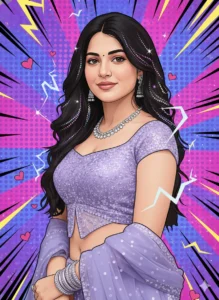
Transform the image into a high-end, professional pop-art vector illustration.

Use clean, precise vector shapes with accurate facial features, soft cartoon-style detailing, and minimal halftone shading.

Enhance the composition with comic-style bursts, dotted patterns, motion lines, dynamic energy effects, and sparkle highlights derived from the photo’s dominant color palette.

Apply bold outlines, crisp edges, and vibrant yet balanced colors throughout. Create a fully color-adaptive pop-art background (no plain or empty areas) and include cute pink heart accents to add playful charm.

Strict Requirements:
• No white background
• No borders or frames
• No transparent areas
• No blank edges or crop gaps
• No unfinished background
• No rough edges or blur

The final artwork should feel polished, energetic, and gallery-ready with a complete, seamless pop-art finish.Character Intro AI Photos Ko Viral Kaise Banayein?
- Expression sabse important hai (confidence/intensity)
- Over-editing avoid karo, realism rakho
- Caption example: “Character introduction (AI-generated)”
- Hashtags: #CharacterIntro #GeminiAI #CinematicEdit
Common Mistakes Jo Avoid Karni Chahiye
- Too much glow ya blur
- Cartoonish effects
- Low-quality input photo
- Prompt Hindi me likhna
Clean + cinematic + powerful = best result
Final Words
Google Gemini Character Intro AI Photo Editing Prompt creators ke liye ek high-impact cinematic trend hai. Sahi prompt aur lighting ke saath aap apni simple photo ko movie-level character introduction poster ya reel frame me convert kar sakte ho.
Agar aap aise hi copy–paste ready AI photo editing prompts Hindi me chahte ho, to Bloggerohan.com ko bookmark karna mat bhoolna. Yahan aapko milte rahenge latest, trending aur working AI prompts.
Also Read:
- Celebrity Selfie AI Video Prompt for Instagram Reels
- Instagram Viral Man Flying in the Sky AI Video Editing Prompt

I’m Rohan, an AI prompt creator from Kanpur, UP, India, focused on sharing copy–and–paste–ready AI photo and video editing prompts for modern content creators.