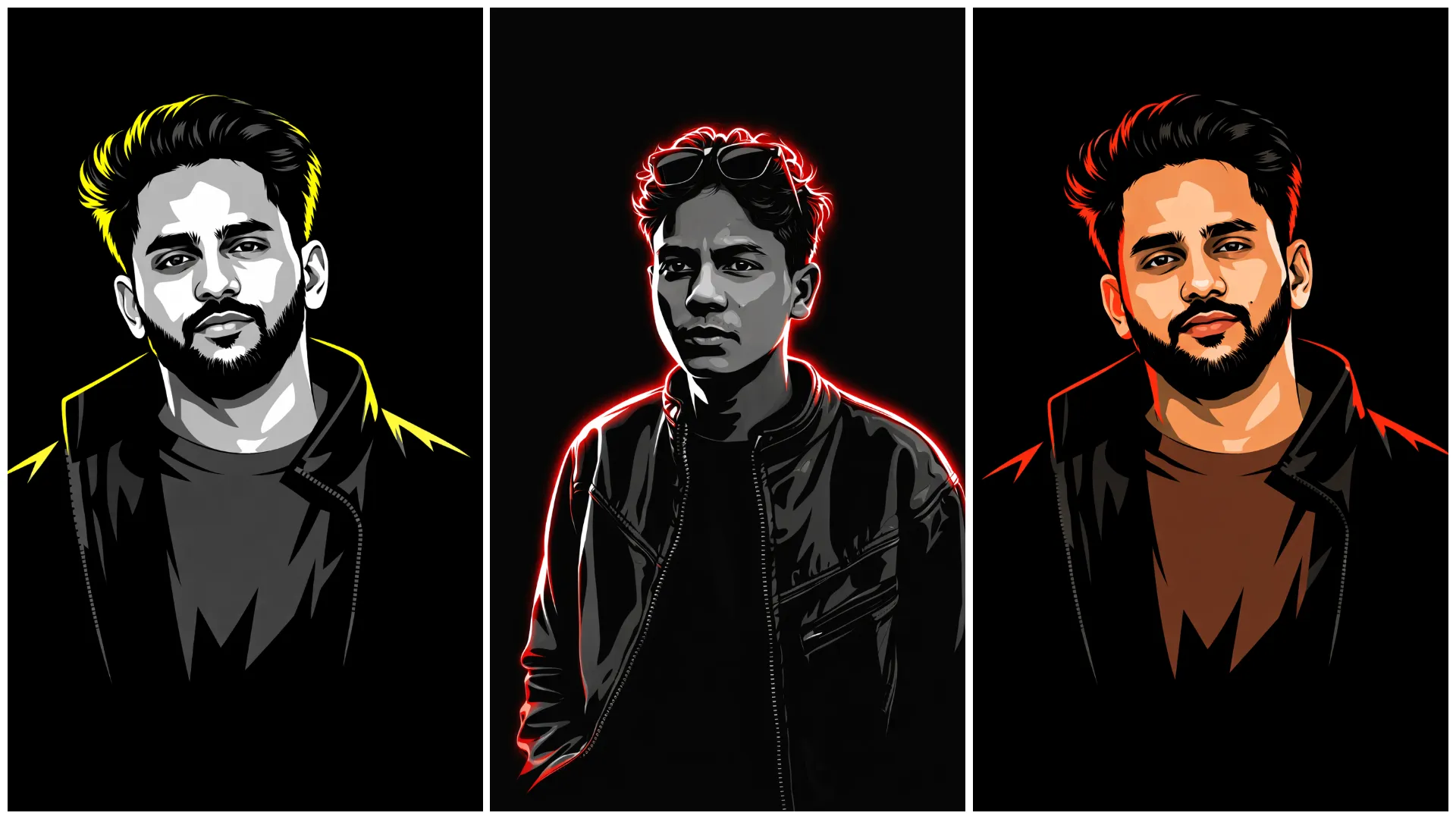
Aaj kal Instagram par vector art portraits ka trend bahut popular ho gaya hai. Vector style images clean lines, bold colors aur minimal shading ke saath ek professional graphic design look deti hain. Ab aap apni normal photo ko Vector Art AI Photo Editing Prompts ka use karke vector art style portrait me convert kar sakte ho using AI tools jaise ChatGPT.
Is article me tum jaanoge:
- Vector art AI photo editing prompt kya hota hai
- AI se vector style portrait kaise banayein
- Prompt ko professional design style kaise likhein
- Different vector art looks ke liye prompt placeholders
Vector Art AI Photo Editing Prompt Kya Hota Hai?
Ye ek text-based AI instruction hota hai jo AI ko batata hai:
- Image vector illustration style me ho
- Clean outlines aur smooth shading ho
- Colors bold aur minimal ho
- Background simple ya gradient ho
Agar prompt properly likha ho, to output ek professional vector portrait artwork jaisa lagta hai.
Vector Art AI Photos Kyun Trend Kar Rahi Hain?
- Graphic design style look
- Instagram DP aur brand profile friendly
- Poster aur logo design me use
- Clean minimal aesthetic
Isi liye vector art AI prompts 2026 me design niche me viral ho rahe hain.
ChatGPT Se Vector Art AI Photo Kaise Banayein?
Step 1: Google Gemini Open Karein
ChatGPT Image generation ya editing mode open karein.
Step 2: Apni Clear Photo Upload Karein
- Front portrait best hota hai
- Face clearly visible ho
Step 3: Prompt English Me Paste Karein
Prompt me keywords use karein:
- vector illustration
- clean outlines
- flat colors
Step 4: Settings Select Karein
Aspect ratio
- Profile → 1:1
- Poster → 4:5
Style
- Vector
- Illustration
- Minimal
Quality → High
Step 5: Final Touch
- Lines sharp rakhein
- Colors balanced rakhein
Trending Vector Art AI Photo Editing Prompts 2026
Create a 3:4 vertical ultra-clean vector portrait based strictly on the provided reference image.

The final artwork must preserve the subject’s facial identity with absolute accuracy. Facial features must remain 100% identical to the original reference image. Do NOT modify facial structure, proportions, skin tone, bone structure, eye spacing, nose shape, lip shape, jawline, hairline, beard density, or any defining characteristics.

Only the visual style should change — identity must remain untouched. This is strictly a style transformation, not a face alteration.

Style: Convert the portrait into a high-contrast neo-noir vector illustration with sharp, clean vector edges and minimal shapes while maintaining recognizable realism.

Composition:
• Tight head-and-upper-neck crop
• Maintain the exact same face orientation and angle as the reference image
• Strong cinematic framing
• Subject placed centered or slightly off-center
• Large negative space around the subject for a bold graphic look

Background:
Pure solid black (#000000) background
No textures, gradients, patterns, or noise

Lighting:
Dramatic single-direction rim lighting
Dominant red / crimson edge light illuminating one side of the face
Deep black shadows on the opposite side for strong contrast
Clean separation between illuminated edges and shadow areas

Rendering Style:
Ultra-clean vector shapes, smooth curves, sharp edges, minimal color palette, high contrast neo-noir aesthetic.

The final image should feel like a premium cinematic vector poster, bold, modern, and visually striking while preserving the subject’s exact identity.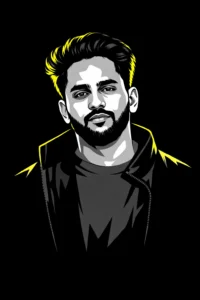
Create a high-contrast vector illustration based strictly on the provided reference image.

The subject’s face and identity must remain 100% identical to the original photo. Preserve all defining facial features exactly as they appear in the reference image, including facial structure, proportions, expression, skin tone interpretation, eye shape and spacing, nose shape, lip shape, jawline, hairline, beard density, and any unique characteristics.

Use the natural hairstyle exactly as shown in the reference image. Do not alter, redesign, or regenerate the hairstyle — maintain its original shape, volume, and direction.

Style Transformation:
Convert the portrait into a minimalist high-contrast vector illustration with a bold graphic aesthetic.

Rendering Style:
• Face and clothing rendered in grayscale tones
• Sharp cel-shading with strong contrast
• Deep black shadows for dramatic depth
• Clean vector edges and smooth shapes
• Minimal but precise detailing to maintain recognizability

Lighting:
Add a bright neon yellow rim light outlining the subject’s silhouette and hair. The rim light should create a subtle glowing edge that separates the subject from the background.

Background:
Pure solid black background (#000000) with no textures, gradients, or noise.

Composition:
Clean poster-style portrait composition with strong visual balance and negative space.

The final artwork should feel modern, bold, and graphic, similar to a premium poster or stylized profile portrait, while maintaining perfect identity preservation.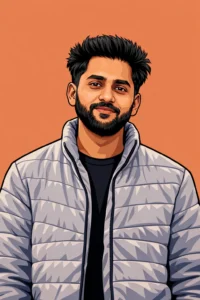
Create a highly detailed vector-style portrait illustration inspired by modern digital portrait art and graphic comic-style rendering.

Use the uploaded photo strictly as the facial reference. The face must remain 99–100% identical to the reference image, preserving the exact facial structure, proportions, expression, eye shape, nose shape, lips, jawline, skin tone interpretation, and all defining characteristics. Do not modify identity, reshape features, or stylize the face beyond the illustration style.

Composition:
• Portrait ratio 3:4 vertical
• Shoulders-up framing
• Maintain the same face orientation and expression as in the reference image
• Balanced portrait composition with the subject as the main focus

Illustration Style:
• Clean vector-style linework with bold outlines
• Rich shading with strong color contrast
• Subtle crosshatching textures to add depth and dimension
• Smooth gradients and layered shading similar to comic or stylized hand-drawn portrait art
• Maintain clear edge definition and crisp vector quality

Lighting:
Even, natural lighting with realistic highlights and soft shadows to preserve facial depth and realism. Avoid overly dramatic lighting that would distort facial features.

Background:
Use a solid warm-toned background (such as muted orange, warm beige, or soft terracotta) to emphasize the subject’s face and create a clean poster-style look. No textures or patterns in the background.

Overall Style:
Modern digital portrait illustration with a clean, professional poster aesthetic, strong readability, and accurate identity preservation while maintaining a stylized vector-art appearance.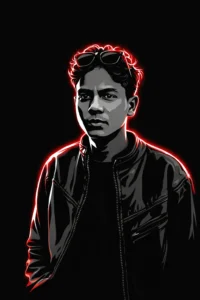
Create a high-contrast vector portrait illustration of a young man with curly hair and sunglasses resting on his forehead.

The portrait should maintain a clean, modern graphic design style with strong visual contrast and sharp vector edges.

Rendering Style:
• Face and clothing rendered using a grayscale color palette
• Sharp cel-shading with bold transitions between light and shadow
• Deep black shadows to create dramatic depth and contrast
• Clean vector shapes with smooth curves and crisp outlines

Lighting:
Add an intense neon red rim light outlining the subject’s silhouette and hair. The rim lighting should create a glowing edge that clearly separates the subject from the background while emphasizing the curly hair texture and facial outline.

Background:
Pure solid black (#000000) background with no textures, gradients, or patterns.

Composition:
• Portrait-focused framing (head and upper shoulders)
• Strong graphic contrast with clear separation between highlights and shadows
• Balanced minimalist layout with strong visual impact

Overall Style:
Minimalist, modern, and edgy neo-noir vector graphic design, similar to a bold poster-style illustration with strong contrast and striking visual presence.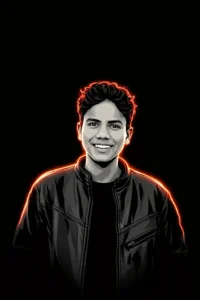
Create a high-quality digital cartoon portrait of a young man with a bright, natural smile, illustrated in a bold vector-art style.

Rendering Style:
• Use a limited monochrome palette of black, white, and grey tones for the face and clothing.
• Apply strong cel-shading with sharp shadow shapes to define facial structure and depth.
• Maintain clean vector outlines with crisp line work and smooth curves.
• Keep the face well-defined, smooth, and highly readable, preserving clear facial features and expression.

Lighting & Effects:
Add glowing neon red highlights around the hair and shoulders, creating a subtle rim-light effect that outlines the subject and gives the portrait a striking modern glow.

Background:
Pure solid black (#000000) background with no gradients, textures, or noise to emphasize the subject and neon edge lighting.

Composition:
• Head-and-shoulders portrait framing
• Balanced composition with the subject centered
• Strong contrast between the illuminated edges and dark background

Overall Style:
Modern, stylish, and vibrant vector cartoon illustration with a bold poster-like aesthetic, combining minimalist color usage with dramatic neon edge lighting.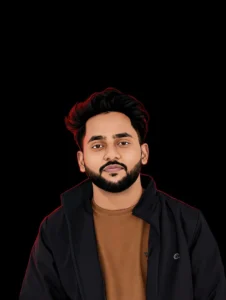
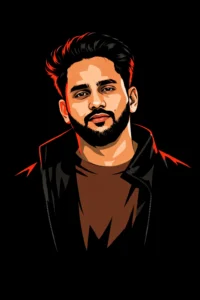
Create a 3:4 vertical ultra-clean vector portrait based strictly on the provided reference photo.

Identity Preservation:
The subject’s face and identity must remain 100% identical to the reference image. Do not modify facial structure, proportions, skin tone, eye shape or spacing, nose shape, lip shape, jawline, hairline, beard density, or any defining characteristics. This is strictly a style transformation only — no identity alteration.

Color Preservation:
Maintain the original colors exactly as they appear in the reference image, including skin tone, clothing, accessories, jewelry, and highlights. Do not recolor or change the palette. Only enhance contrast, lighting, and clarity while keeping the natural color integrity intact.

Composition:
• Vertical 3:4 portrait ratio
• Tight head and upper-neck crop
• Preserve the exact face angle and orientation from the reference image
• Strong cinematic framing with large negative space around the subject
• Subject placed centered or slightly off-center for a poster-style composition

Background:
Pure solid black (#000000) background with no gradients, textures, or patterns.

Lighting:
Apply a dramatic single-side red/crimson rim light outlining the subject’s silhouette and hair, creating a neo-noir cinematic effect. The opposite side should fall into deeper shadows while preserving the natural colors of the face and clothing.

Rendering Style:
Ultra-clean professional vector illustration with sharp edges, smooth gradients, minimal noise, and high clarity.

Overall Look:
Minimalist cinematic vector poster aesthetic with bold contrast, strong rim lighting, and precise identity preservation.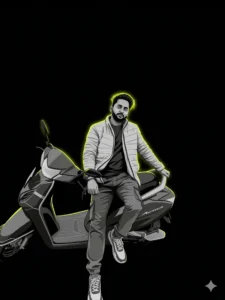
Create a high-contrast vector portrait based strictly on the provided reference image.

Identity Preservation:
The subject’s face and identity must remain 100% identical to the reference image. Do not modify facial structure, proportions, expression, skin tone interpretation, eye shape, nose shape, lip shape, jawline, hairline, beard density, or any defining features. The natural hairstyle from the reference photo must be preserved exactly—do not redesign or regenerate the hair.

Style Transformation:
Convert the image into a minimalist vector illustration style while maintaining accurate facial recognition and proportions.

Rendering Style:
• Face and clothing rendered in grayscale tones
• Sharp cel-shading with strong transitions between light and shadow
• Deep black shadows for dramatic contrast and depth
• Clean vector edges with smooth shapes and crisp outlines

Lighting Effect:
Add a bright neon yellow rim light outlining the subject’s hair and silhouette. The glow should subtly illuminate the edges and create strong separation from the background.

Background:
Pure solid black (#000000) background with no textures, gradients, or noise.

Composition:
Clean poster-style portrait composition with strong negative space and a centered or slightly offset subject placement.

Overall Look:
Modern, edgy vector poster aesthetic with bold contrast, minimalist design, and sharp graphic clarity while maintaining perfect facial identity preservation.Viral Banane Ke Pro Tips
- Vector portrait ko DP ya logo me use karein
- Caption example
“Vector version of me”
Hashtags
#VectorArt
#VectorPortrait
#AIArt
Common Mistakes
- Too many colors
- Blurry outlines
- Over-shading
- Prompt Hindi me likhna
Clean + minimal + sharp lines = best result
Final Words
Trending Vector Art AI Photo Editing Prompts design lovers ke liye ek amazing trend hai. Sahi prompt aur clean illustration style ke saath aap apni simple photo ko professional vector artwork me convert kar sakte ho jo social media profile aur branding dono ke liye perfect hai.
Agar aap aise hi copy–paste ready AI prompts Hindi me chahte ho, to Bloggerohan.com ko bookmark karna mat bhoolna. Yahan aapko milte rahenge latest trending AI prompts design, gaming aur viral niches ke liye.
Also Read:

I’m Rohan, an AI prompt creator from Kanpur, UP, India, focused on sharing copy–and–paste–ready AI photo and video editing prompts for modern content creators.