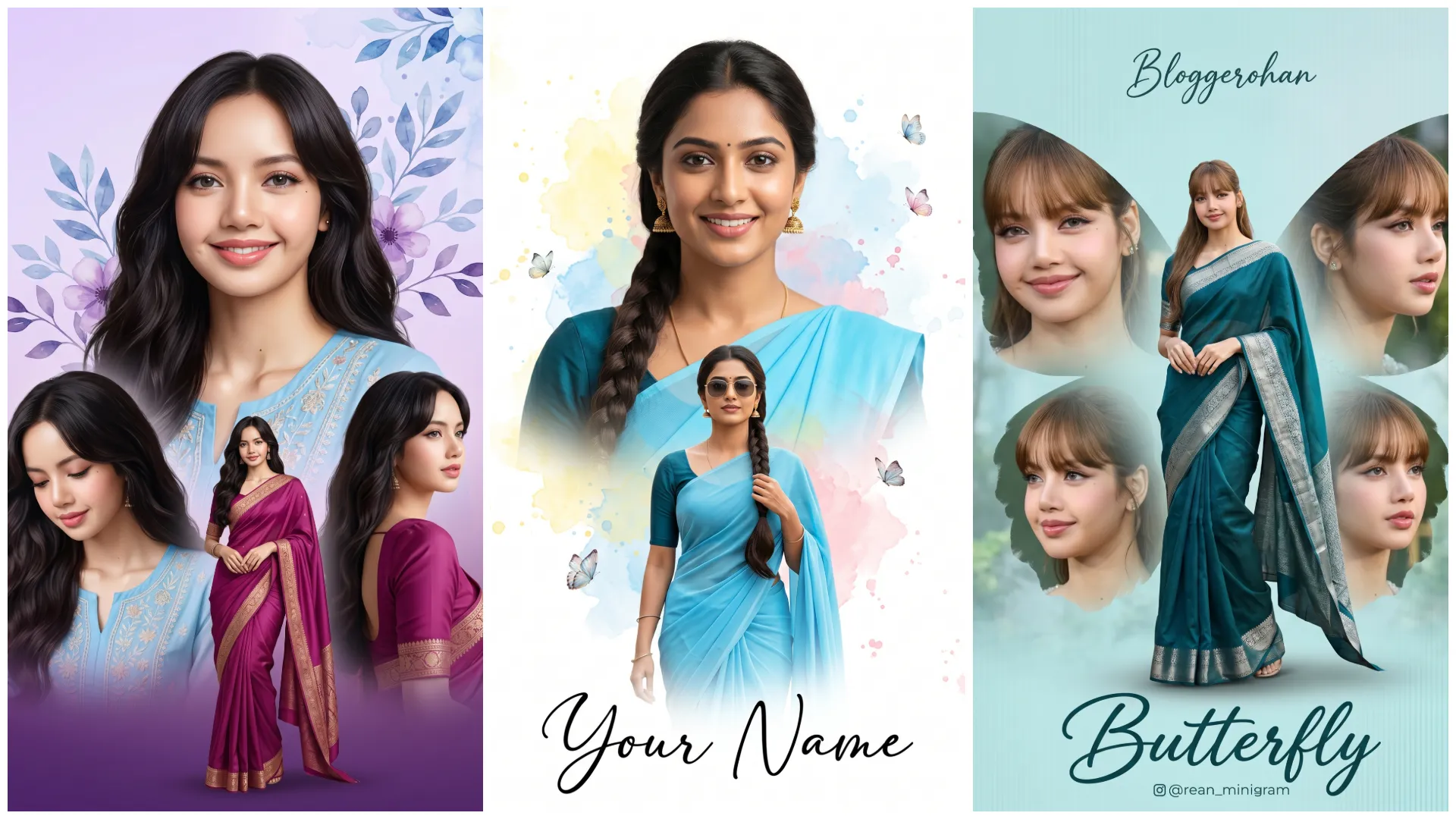
Aaj kal Instagram par girls ke liye ek bahut hi beautiful trend viral ho raha hai Butterfly Effect AI Photo Editing. Is style me photo ke around flying butterflies, glowing particles aur soft pastel lighting add ki jati hai, jisse image ek dreamy fantasy look le leti hai.
Ye trend specially girls ke DP, reels aur aesthetic posts ke liye perfect hai. Ab aap bhi apni simple photo ko Butterfly Effect AI Photo Editing Prompts ke through magical butterfly aesthetic look me convert kar sakte ho using Google Gemini.
Butterfly Effect AI Prompt Kya Hota Hai?
Ye ek text-based AI instruction hota hai jo AI ko batata hai:
- Subject ke around butterflies ho
- Soft glow aur light particles ho
- Colors pastel ya vibrant ho
- Mood dreamy aur aesthetic ho
Agar prompt sahi likha ho, to output ek fantasy style Instagram photo jaisa lagta hai
Girls Butterfly Effect Photos Kyun Trend Kar Rahi Hain?
- Soft & aesthetic visuals
- Instagram DP perfect look
- Fantasy + beauty combo
- High engagement reels
Google Gemini Se Butterfly Effect AI Photo Kaise Banayein?
Step 1: Google Gemini Open Karein
Gemini Image generation ya editing mode open karein.
Step 2: Apni Photo Upload Karein
- Clear portrait best hota hai
- Soft smile ya candid look best lagta hai
Step 3: Prompt English Me Paste Karein
Keywords use karein:
- butterflies flying
- soft glow
- pastel aesthetic
Step 4: Settings Select Karein
Aspect ratio
- DP → 1:1
- Reel → 9:16
Style
- Aesthetic
- Fantasy
- Soft
Quality → High / Ultra
Step 5: Final Touch
- Skin tone natural rakhein
- Over-glow avoid karein
Butterfly Effect Photo Ai Editing Prompts For Girls
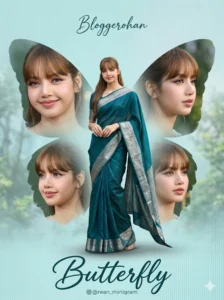
Create a high-resolution cinematic butterfly-themed collage poster in 4K Ultra HD with a vertical 3:4 aspect ratio, styled as a premium photo manipulation artwork.

Face Reference (Strict Identity Lock – Critical):
Use the uploaded image as the ONLY facial reference. The face must remain 100% identical — no reshaping, no beautification, no smoothing.
Preserve exact facial structure, skin tone, hairstyle, and expression.

Concept & Composition (Butterfly Layout):

• Center (Main Full-Body Subject):
A large, elegant full-body image of a young South Indian woman wearing a deep teal/blue saree with a silver border.
• Graceful standing pose with a slight twirl motion
• Natural, soft, feminine expression

• Surrounding (Butterfly Wings Structure):
• Include 4 smaller portrait shots (close-up, smiling, side angles)
• Arrange them symmetrically around the main subject, forming a butterfly wing shape
• Apply soft feathered edges for smooth blending

Background & Environment:
• Soft pastel teal/blue gradient background
• Subtle vertical texture lines for depth
• Light mist/fog effect at the bottom
• Slight blurred greenery/trees for a natural dreamy feel

Lighting & Style:
• Soft natural lighting with gentle highlights
• Smooth, realistic skin tones (no over-smoothing)
• Subtle glow and depth-of-field effect

Typography & Text Placement:
• Top: Elegant handwritten font with the name “Prompt Seen”
• Bottom: Stylish cursive title “Butterfly”
• Add a small Instagram-style username below (clean and minimal)

Details & Rendering:
• Ultra-detailed skin texture with natural realism
• Realistic saree fabric with fine texture and folds
• Clean blending and sharp focus on main subject

Style:
Dreamy, elegant, and feminine cinematic collage poster, soft aesthetic with a studio-quality finish

Render Settings:
• Aspect ratio: 3:4 vertical
• Style: raw / photorealistic

Negative Prompt (Strict):
face alteration, identity mismatch, plastic skin, over-smoothing, blur on main subject, cluttered layout, unrealistic colors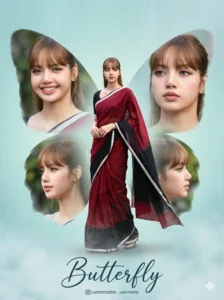
Create a high-resolution cinematic butterfly-themed collage poster in 4K Ultra HD with a vertical 3:4 aspect ratio, styled as a premium photo manipulation artwork.

Face Reference (Strict Identity Lock – Critical):
Use the uploaded image as the ONLY facial reference. The face must remain 100% identical — no reshaping, no beautification, no smoothing.
Preserve exact facial structure, skin tone, hairstyle, and expression.

Concept & Composition (Butterfly Layout):

• Center (Main Full-Body Subject):
A large, elegant full-body image of a young South Indian woman wearing a deep teal/blue saree with a silver border.
• Graceful standing pose with a slight twirl motion
• Soft, natural, feminine expression

• Surrounding (Butterfly Wings Design):
• Include 4 smaller portrait shots (close-ups, smiling, side angles)
• Arrange them symmetrically to form a butterfly wing shape
• Apply soft feathered edges for smooth blending

Background & Environment:
• Soft pastel teal/blue gradient background
• Subtle vertical texture lines
• Light mist/fog effect at the bottom
• Slight blurred greenery/trees for depth

Lighting & Style:
• Soft natural lighting with gentle highlights
• Smooth, realistic skin tones (no over-smoothing)
• Subtle glow and depth-of-field effect

Typography & Text (Customizable):
• Top: Elegant handwritten name → “Love” OR “nag_anji1” (user choice)
• Bottom: Stylish cursive title → “Butterfly”
• Optional: Add a small Instagram-style username below

Details & Rendering:
• Ultra-detailed skin texture with natural realism
• Realistic saree fabric with fine texture and folds
• Clean blending and sharp focus on main subject

Style:
Dreamy, elegant, and feminine cinematic collage poster, soft aesthetic with a studio-quality finish

Render Settings:
• Aspect ratio: 3:4 vertical
• Style: raw / photorealistic

Negative Prompt (Strict):
face alteration, identity mismatch, plastic skin, over-smoothing, blur on main subject, cluttered layout, unrealistic colors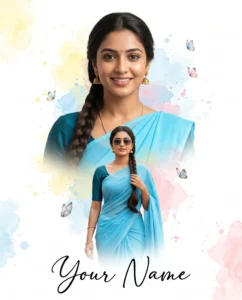
Create a high-resolution cinematic double-exposure portrait in 4K Ultra HD with a clean vertical composition (3:4 or 4:5), styled as a modern artistic poster.

Face Reference (Strict Identity Lock):
If a reference image is provided, use it as the ONLY facial reference. The face must remain 100% identical — no reshaping, no beautification, no smoothing. Preserve exact facial structure, skin tone, hairstyle, and expression with natural skin texture.

Subject & Appearance:
• A beautiful Indian woman with a long braid hairstyle
• Wearing a vibrant sky-blue saree with a dark teal blouse
• Natural, elegant, and graceful presence

Concept & Composition (Double Exposure Layout):

• Top Half (Primary Portrait):
• Close-up of the subject with a warm, natural smile
• Soft lighting with clean facial detail

• Bottom Half (Secondary Pose):
• A stylish mid/full-body pose of the same subject
• Wearing sunglasses for a modern contrast
• Confident, composed posture

• Smooth double-exposure blending between both layers

Background & Artistic Elements:
• Clean white background for a minimal aesthetic
• Soft watercolor splashes in yellow, blue, and pink tones
• Light, airy distribution (not cluttered)
• Delicate butterflies floating around for a dreamy touch

Lighting & Color Style:
• Soft, even lighting with gentle highlights
• Natural skin tones (no over-smoothing)
• Balanced, slightly vibrant color palette

Typography:
• Bottom: “Your Name” in elegant black cursive calligraphy
• Clean, minimal placement with good spacing

Details & Rendering:
• Ultra-detailed skin texture with natural realism
• Realistic saree fabric folds and flow
• Clean blending between exposure layers

Style:
Artistic double-exposure poster, soft, feminine, modern, and Instagram-ready

Negative Prompt (Strict):
face alteration, identity mismatch, plastic skin, over-smoothing, messy watercolor, cluttered composition, unrealistic colors, blur on subject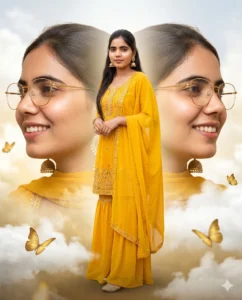
Create a cinematic hyper-realistic triple-exposure portrait in 8K Ultra HD with a vertical composition (3:4 or 4:5), styled as a premium fashion poster.

Face Reference (Strict Identity Lock):
If a reference image is provided, use it as the ONLY facial reference. The face must remain 100% identical — no reshaping, no beautification, no smoothing. Preserve exact facial structure, skin tone, hairstyle, and expression with natural skin texture and pores.

Concept & Composition (Triple-Exposure Layout):

• Center (Main Full-Body Subject):
• A full-length portrait of a beautiful Indian woman standing gracefully
• Wearing a vibrant yellow heavy embroidered georgette sharara suit with a matching dupatta
• Elegant posture with a soft, confident expression

• Side Layers (Dual Close-Up Profiles):
• Two large, soft-focus close-up portraits placed on left and right sides
• Slightly angled profile views, smiling naturally
• Wearing gold spectacles and traditional jhumka earrings
• Smoothly blended into the composition with balanced symmetry

Background & Atmosphere:
• Dreamy white clouds blended with golden mist
• Soft, ethereal environment with depth
• Delicate golden butterflies floating around the subject

Lighting & Color Style:
• Soft glowing light with gentle highlights
• Warm golden tones with balanced contrast
• Natural skin tones (no over-smoothing)

Details & Rendering:
• Highly detailed embroidery on sharara suit
• Realistic fabric folds and flow
• Ultra-detailed skin texture with natural pores
• Clean, seamless blending between all exposure layers

Style:
Luxury cinematic fashion poster, dreamy, elegant, and high-end editorial aesthetic

Negative Prompt (Strict):
face alteration, identity mismatch, plastic skin, over-smoothing, cluttered composition, unrealistic glow, blur on main subject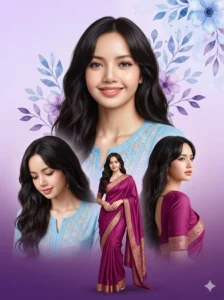
Create a dreamy, elegant digital greeting card collage in 4K Ultra HD with a vertical composition (3:4 or 4:5), styled as a soft, premium photo manipulation artwork.

Face Reference (Strict Identity Lock):
Use the uploaded image as the ONLY facial reference. The face must remain 100% identical — no reshaping, no beautification, no smoothing. Preserve exact facial structure, skin tone, hairstyle, and expression with natural skin texture.

Concept & Composition (Multi-Pose Collage):

• Top Center (Primary Portrait):
• A large, dominant bust shot of the subject
• Warm, natural smile with soft lighting

• Supporting Poses (Layered Around):
Include 3 additional poses arranged below and around the main portrait:
• Looking down gently (soft emotional tone)
• Standing confidently (mid/full-body pose)
• Looking to the side (graceful profile angle)

• All elements should be smoothly overlapping with soft feathered edges
• Maintain balanced spacing and clean layering

Appearance & Styling:
• Long, dark, wavy hair with natural flow
• Wearing elegant traditional Indian outfits (sky blue and magenta kurtis/sarees)
• Realistic fabric textures and folds

Background & Environment:
• Soft vertical gradient background:
– Light lavender at the top
– Deep rich purple at the bottom
• Clean and minimal, with depth

Artistic Elements:
• Watercolor-style floral and leaf elements
• Shades of blue and purple
• Placed mainly in the upper background area
• Light, airy, and not cluttered

Lighting & Color Style:
• Soft diffused lighting
• Gentle highlights and smooth tonal transitions
• Natural skin tones (no over-smoothing)
• Harmonized pastel color palette

Details & Rendering:
• Ultra-detailed skin texture with natural realism
• Clean blending between all collage elements
• Sharp focus on main subject with soft depth transitions

Style:
Dreamy greeting card aesthetic, feminine, soft, elegant, and Instagram-ready

Negative Prompt (Strict):
face alteration, identity mismatch, plastic skin, over-smoothing, cluttered layout, harsh lighting, unrealistic colors, blur on main subjectViral Banane Ke Pro Tips
- Soft expressions wali photos use karo
- Caption example:
“Living in my butterfly era (AI generated)”
- Hashtags:
#ButterflyEffect #GirlsAesthetic #AIEditing
Common Mistakes
- Too many butterflies
- Over-glow
- Unrealistic colors
- Prompt Hindi me likhna
Soft + balanced + dreamy = best result
Final Words
Trending Butterfly Effect AI Photo Editing Prompt For Girls ek perfect trend hai jo simple photos ko magical aesthetic artwork me convert karta hai. Sahi prompt aur pastel lighting ke saath aap apni image ko dreamy butterfly theme photo me badal sakte ho jo Instagram par instantly viral potential rakhta hai.
Agar aap aise hi copy–paste ready AI prompts Hindi me chahte ho, to Bloggerohan.com ko bookmark karna mat bhoolna. Yahan aapko milte rahenge latest trending AI prompts.
Also Read:
- Trending AI Lockscreen Wallpaper Editing Prompts 2026
- Instagram Viral Princess Girl AI Video Editing Prompt

I’m Rohan, an AI prompt creator from Kanpur, UP, India, focused on sharing copy–and–paste–ready AI photo and video editing prompts for modern content creators.